
Here's what's happening:
On January 19, 2026, Enertech launched our new single sign-on platform: EnertechOne. Existing support site accounts have automatically be migrated to EnertechOne. This new login experience replaces the way you're accustomed to logging into other Enertech applications too. Until now, you've needed a different password for each Enertech tool. That changes with EnertechOne.
Having trouble logging into Enertech One? Jump to the Troubleshooting Section
What is Single Sign-On?
Think of Single Sign-On like having one master key for all the doors in your building, instead of carrying a separate key for each door. With EnertechOne, you'll use just one username and password to access all your Enertech tools and applications. No more remembering different login credentials for each system or resetting forgotten passwords. This means you can focus on your work without the hassle of managing multiple accounts.
One Set of Secure Credentials to Access:

Enertech Support Site

Enertechnician

GeoSelect Pro

GeoAnalyst

EnerSketch
Key Benefits
Simplified Access
Manage your login credentials in one place without the need to remember multiple usernames and passwords.
Improved Security
Enhance security with unified access controls, reducing the risks associated with managing multiple sign-in methods.
Efficient Workflow
Seamlessly switch between tools, enabling a more focused and productive work environment.
Self-Service Reset
Password management becomes much easier to handle without Enertech intervention.
Implementation Timeline
- First Rollout: EnertechOne accounts will be created for existing Enertech Support Site users starting January 19, 2026. The Support Site will begin authenticating users through EnertechOne at this time.
- New Features Unlocked: Customers using EnertechOne with the EnerTechnician app will unlock new
features:
- Mobile Warranty Registration
- Mobile Warranty Claim Submission
- Enertech Unit Feedback
- Future Expansions: Other tools will transition to EnertechOne over the coming months.
What You Need To Do
Here's your simple checklist to prepare for EnertechOne:
-
Look for your welcome email
If you already have a Support Site account, you'll receive an email from Enertech with your temporary password on January 19, 2026.
-
Log in and set your new password
Use the temporary password to log in, then create a strong, memorable password.
-
That's it!
Use your new EnertechOne credentials to access all Enertech applications going forward. (Not all applications will transition immediately. When they do, you'll see the EnertechOne login screen.)
Identifying EnertechOne Login
How to Recognize the Login Screen
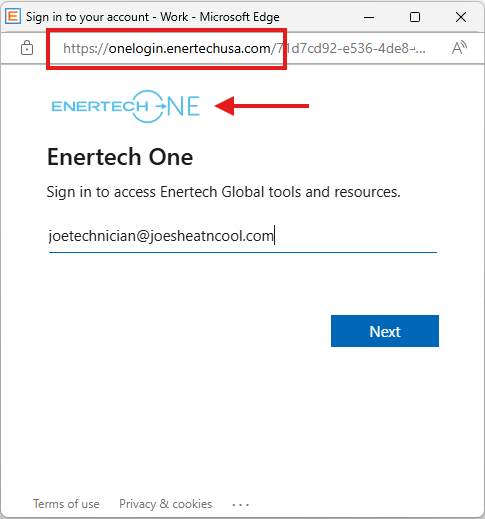
When it's time to use your EnertechOne credentials, you'll see this login screen:
Key identifiers of the EnertechOne login:
- The URL will begin with:
https://onelogin.enertechusa.com - You'll see the EnertechOne logo at the top of the login form
Frequently Asked Questions
-
Will my old password still work?
No. Starting January 19, 2026, you will need to use your new EnertechOne credentials. Your previous login information for individual Enertech applications will no longer work for EnertechOne-enabled services.
-
Do I need to create a new account?
No, you don't need to create an account. Enertech will create your EnertechOne account for you and send your temporary password via email. Simply log in and set your permanent password.
-
What if I didn't receive a welcome email?
First, check your spam or junk folder. If you still can't find it, contact Enertech Customer Relations and they can verify your email address and resend the welcome email.
-
Can I use the same password as my old Enertech login?
For security reasons, we recommend creating a new, unique password for EnertechOne. Your password should be at least 8 characters and include a mix of letters, numbers, and special characters.
-
Will I need to log in separately for each Enertech application?
No! That's the beauty of Single Sign-On. Once you log in with EnertechOne, you'll have access to all EnertechOne-enabled applications without logging in again during your session.
-
What happens if I forget my EnertechOne password?
You can reset your password anytime using the "Forgot password?" link on the EnertechOne login page. You'll receive a password reset link at your registered email address. Note that Enertech staff cannot reset your password for you—you must use the self-service reset.
Troubleshooting
Having trouble logging into EnertechOne? Follow these steps:
Step 1: Check Your Email
Users who already have a support site account will receive an email from Enertech containing a temporary password for your EnertechOne login. Check your inbox (and spam/junk folder) for this email before attempting to log in.
Step 2: Reset Your Password
If you received the email but your username and password are not working, please use the EnertechOne self-service password reset feature. You can find the "Forgot password?" link on the EnertechOne login page.
Important: Enertech cannot reset your EnertechOne password for you. You must use the self-service password reset.
Step 3: Contact Customer Relations
If you have tried the steps above and are still unable to log in, please contact Enertech Customer Relations for additional troubleshooting assistance.
- Phone: 618-664-9010
- Email: customerrelations@enertechusa.com
- Hours: Monday - Friday, 8:00 AM - 5:00 PM CST